Add a threaded response to a logbook entry
What you'll do
Respond directly to an existing logbook entry so your reply stays attached to the original record. Threading keeps conversations together: a question and its answers, a decision and its follow-up actions, an observation and its clarifications.
Before you start
- You are in an event (named or default) with a logbook open in the tabbed view
- You have a role with at least Contribute or Edit permission on Logbooks (the built-in Editor role has this)
- The entry you want to respond to is a parent entry (you can't reply to a reply; threads are one level deep)
Steps
-
Find the entry you want to respond to in the logbook list. Entries that already have responses show a chevron (▸) on the left side.
-
Click the entry row to expand it, or click the reply icon on the right side of the entry.
-
Type your response. Set the priority and type as appropriate. For example, if you're answering a Question, set the type to Answer.
-
Submit the response.
Result
Your response appears indented below the parent entry with a sub-numbered ID. If the parent is entry 13, your response is 13.1. A second response would be 13.2.
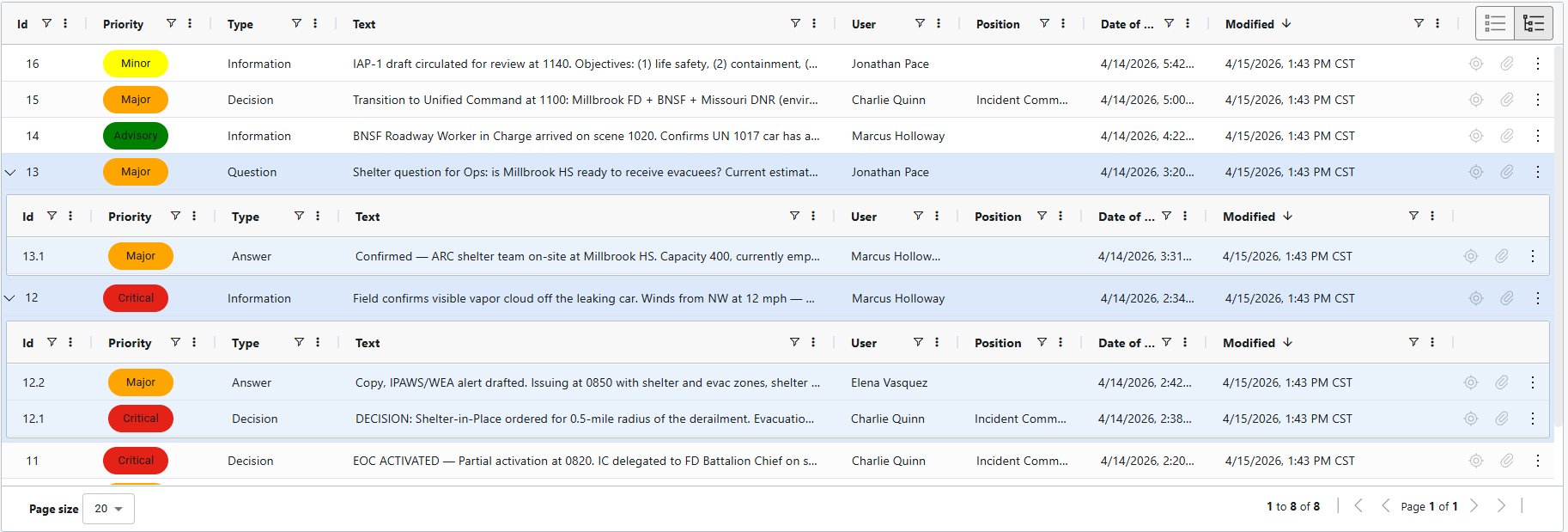
The parent entry now shows a chevron indicating it has children. Click the chevron to expand or collapse the thread.
Your response is tagged with your name and whatever position you currently hold, not the position of the original entry's author.
Tips
- Threads are one level deep. You can respond to a parent entry, but you can't respond to a response. If a thread spawns a new topic, start a new parent entry and reference the original entry's ID in your text.
- The two view-mode icons in the top right of the entry list toggle between a flat view and a nested view. Use the nested view to see all threads expanded at once.
- Use threading liberally for Question/Answer pairs. When someone later reviews the logbook, they'll see the question and answer together instead of separated by dozens of unrelated entries.