Understanding logbooks
The short version
A logbook is a record of what happened during an event. COBRA gives your organization multiple logbooks (one for operations, one for public information, one for resource tracking, and so on) so that different teams can maintain their own records without stepping on each other. All of these logbooks exist at the organization level, but the entries inside them are scoped to whatever event you're working in.
If you're coming from paper-based ICS, think of each logbook as a separate ICS 214 (Activity Log) dedicated to a specific function.
Why multiple logbooks matter
A single logbook for everything falls apart fast. During a real event, the operations team is posting field updates, the PIO is tracking media inquiries, the planning section is logging resource requests, and the IC is recording decisions. If all of that goes into one list, nobody can find anything and the signal-to-noise ratio drops to zero.
COBRA solves this by letting your organization define a set of logbooks, each with a name and a purpose, that are available across all events. During any event, each logbook tracks its own entries, its own threading, and its own activity. Users choose which logbooks to monitor by adding them to their personal tab strip.
Organization logbooks vs. event content
This is the key distinction:
- Logbooks are defined at the organization level. Your admin creates "Operations Log," "Public Information," "Resource Tracking," and so on. These exist once and appear in every event.
- Entries are scoped to the current event. When you post to the Operations Log during a wildfire response, that entry belongs to the wildfire event. Switch to a different event and the Operations Log is still there, but the entries are different.
The logbook dashboard makes this visible. It lists every logbook your organization has defined, and shows the entry count and last activity for each logbook in the current event.
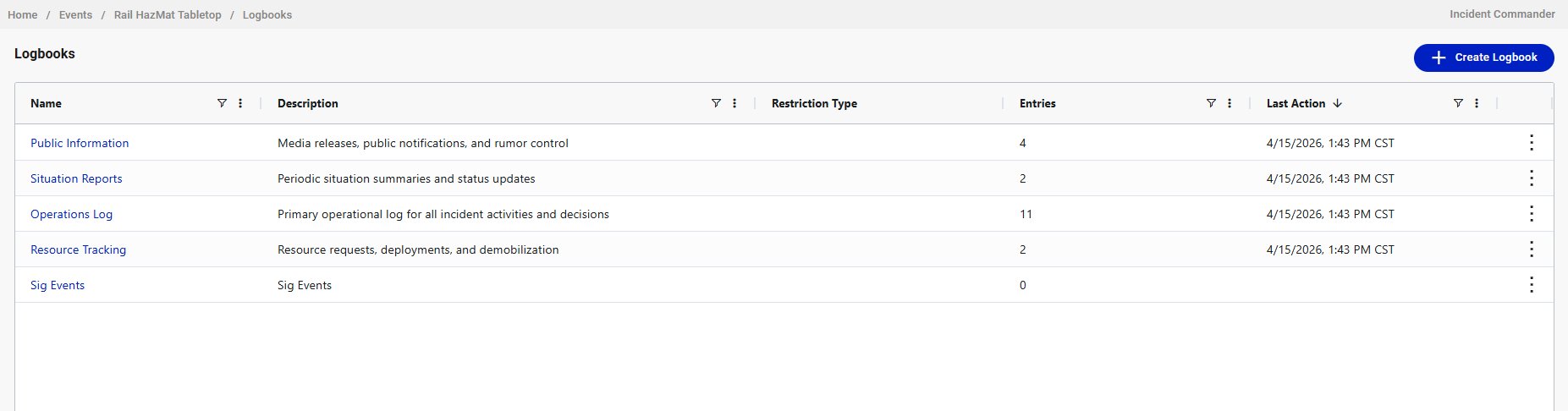
A logbook with zero entries doesn't mean it's broken or unused. It means nobody has posted to it in this particular event yet.
The tabbed view: your personal workspace
You probably don't need to watch every logbook your organization has. The tabbed view lets you pick the logbooks that matter to your role and open them as tabs. Click the + button at the end of the tab strip to add a logbook from a picker. Close a tab with the kebab menu next to its name.
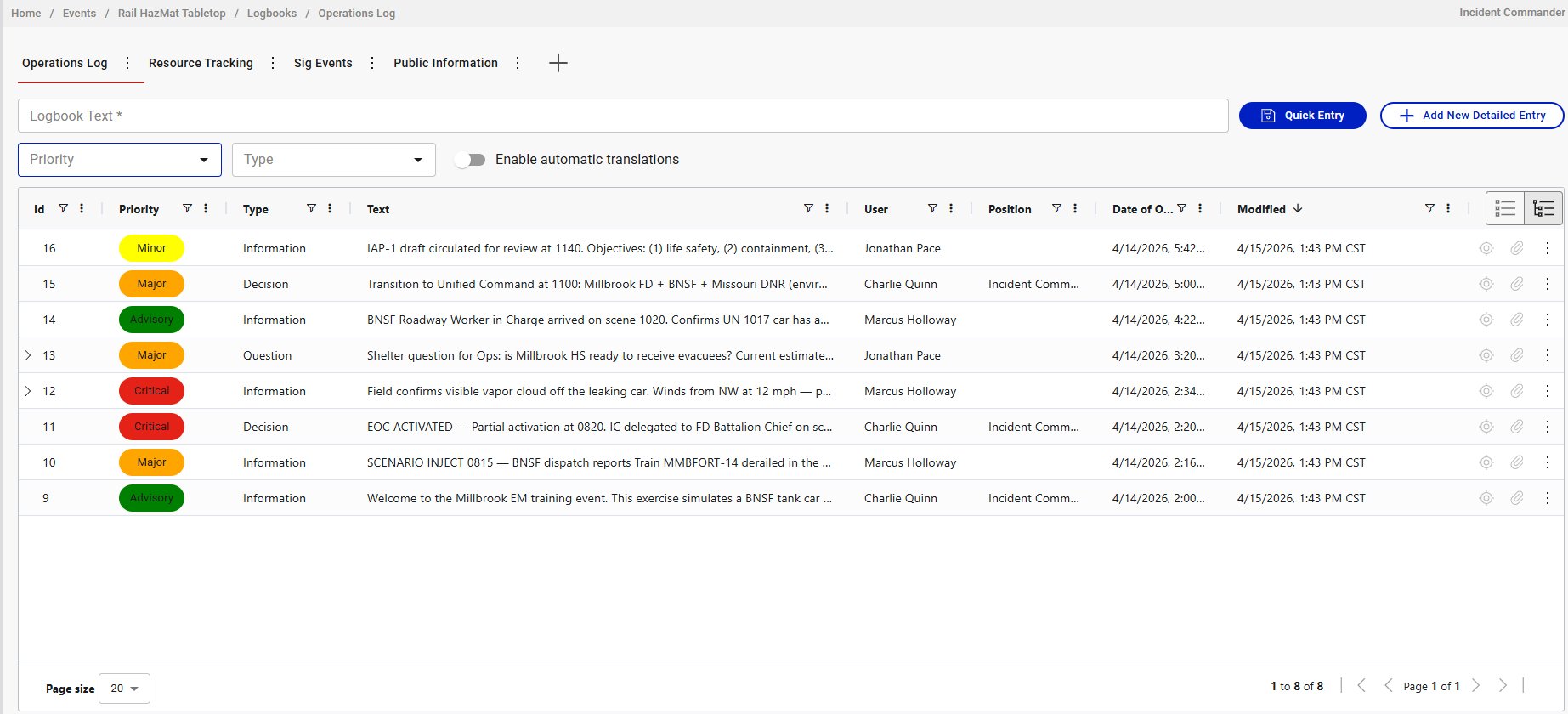
Tabs are personal. Your tabs don't affect what other users see. Set up the logbooks relevant to your position and leave the rest for people who need them.
Entry types
Every logbook entry has a type that categorizes what kind of record it is:
- Information: status updates, observations, reports, field conditions. The most common type.
- Question: requests for information or clarification. Often gets threaded responses.
- Decision: command decisions, policy changes, authorizations. High-value entries for after-action review.
- Answer: responses to questions or confirmations of action. Typically posted as a threaded response under a Question entry.
Setting the right type matters for filtering and for after-action review. When someone later asks "what decisions were made during this event," they'll filter by Decision type, so tag your entries accurately.
Priorities
Entries also carry a priority level that signals urgency:
- Advisory (green): general updates, routine information
- Minor (yellow): routine communications, standard updates
- Major (orange): important updates requiring attention
- Critical (red): immediate threats, life safety issues, urgent situations
Use priorities consistently. If everything is Critical, nothing is.
Threading
Any entry can have threaded responses, one level deep. A parent entry might be a Question; the children are Answers. Or a parent might be an Information entry that prompts follow-up questions and clarifications.
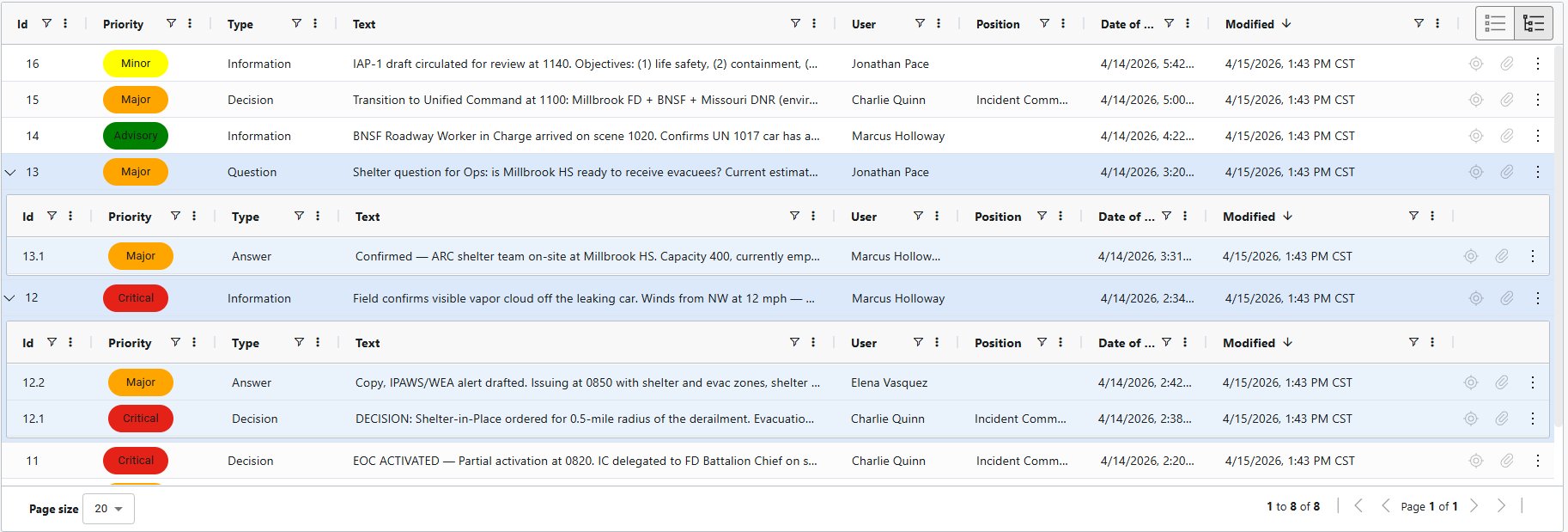
Children use a sub-numbered ID (13.1 is the first response to entry 13). Each response is posted by whoever authored it, tagged with their position at the time.
Threading keeps conversations attached to the record that started them. Without it, a question and its answer would be separated by dozens of unrelated entries and impossible to reconstruct later.
One level deep is a deliberate constraint. If a thread spawns a new topic, start a new parent entry and reference the original.
Translation
COBRA logbooks support multilingual operations. When the Enable automatic translations toggle is on, entries you create are automatically translated and stored in the database alongside the original text. Other users see the translated version when their language preference differs from yours.
The important thing to understand: translation is an authoring action, not a viewing action. The toggle must be on when you create the entry. Once stored, the translations are permanent and available to all viewers. If the toggle was off when you posted, there's no translation to show.
In multinational events, establish as a standard practice that all operators enable the translation toggle at the start of every session. Otherwise, you'll end up with a mix of translated and untranslated entries.
What belongs in a logbook vs. elsewhere
- Logbook: anything that should be part of the permanent event record. Actions, decisions, observations, status updates, questions and answers. If someone reviewing the event six months later needs to see it, it goes in the logbook.
- Chat: real-time coordination that doesn't need to be preserved as a formal record. Quick questions, informal updates, "are you there" messages.
- Checklist: tasks that need to be tracked to completion. Checklists track what needs to happen; logbooks record what did happen.
When in doubt, log it. An extra logbook entry costs nothing. A missing record during after-action review costs credibility.