Enter a named event
What you'll do
Enter an existing named event so that everything you do in COBRA (logbook entries, chat messages, map annotations, status chart updates) is recorded against that event instead of daily operations.
Before you start
- The event you want to enter already exists
- You have permission to access the event
Steps
You can enter a named event from three places, depending on where you are:
From the organization landing page: Click the event name in the Recently Active Events panel.
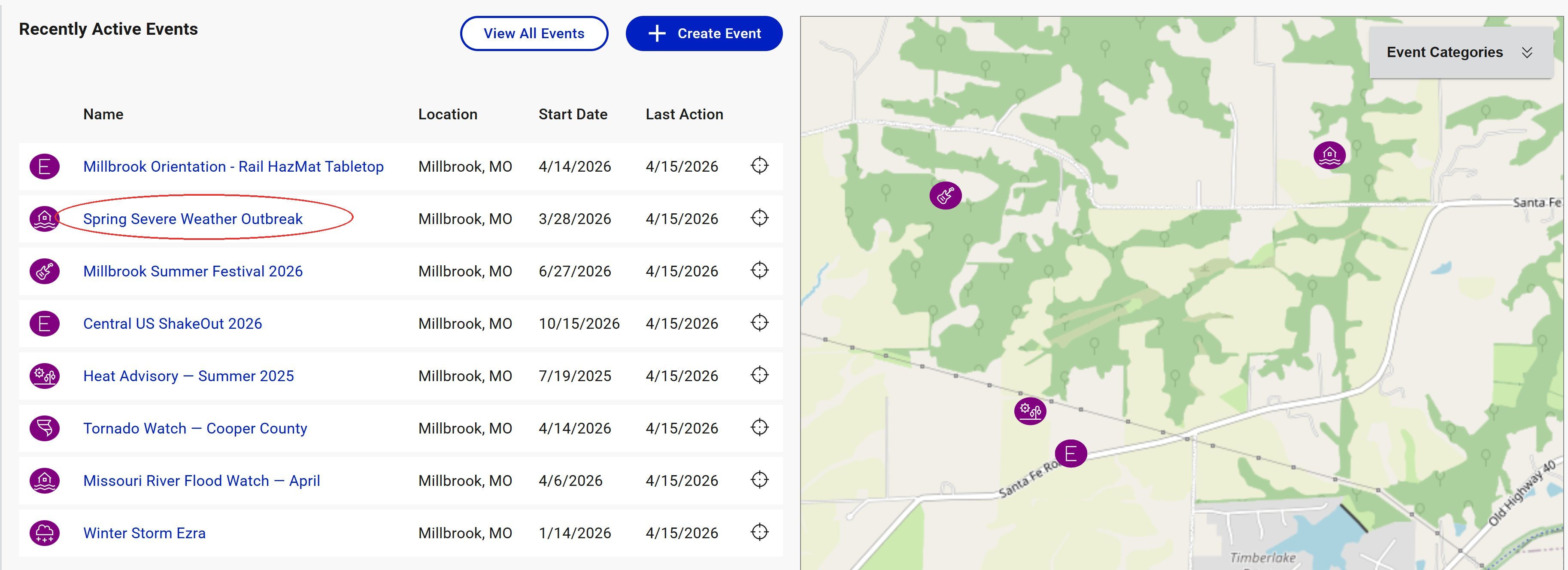
From the event list: Click the events icon in the left navigation, then click the name of the event you want to enter.
From an event you're editing: Navigating to an event's edit page automatically places you in that event.
Result
The top bar changes from Daily Operations to the event name, and the event status banner appears beneath it (for example, a blue Standby bar). All tool panels on the page now show data scoped to this event. The breadcrumb updates to Home / Events / [Event Name].
Tips
- Recently Active Events is the fastest way in for events you're working in regularly. It shows the events your organization has touched most recently.
- Only one named event is active at a time. Entering a new event exits whatever event you were in previously.
- Your role and position are per-event. If you use different positions for different events, set your position after entering the event.
- To inspect an event's details without leaving the tool you're in, click the event name in the top bar to open the event details flyout. The flyout shows the event's metadata (dates, type, category, description, location) in a read-only view and also exposes the Edit Event link for making changes.